
Set up Post Purchase Upsell Hero in a few minutes. Once these steps are completed, you are ready to earn extra revenue on every eligible order. Right after you confirm your plan, the app also invites you to create your first funnel on the spot; skip that screen if you would rather follow the steps below in order.
1. Select Post Purchase Upsell Hero as your post-purchase app
Shopify allows exactly one app to control the post-purchase page, so this step activates the app for your store:
In your Shopify admin, go to Settings > Checkout.
Scroll to the Post-purchase page section.
Select Post Purchase Upsell Hero and click Save.
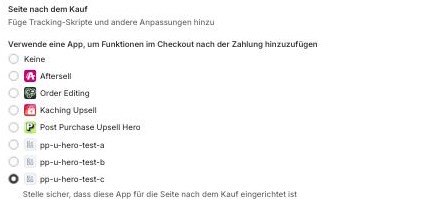
If another upsell app was selected before, it is replaced in this slot.
2. Create your first funnel
Open the app and click Create funnel.
Trigger (optional): define when the funnel should fire, for example a specific product or collection in the order. A funnel without a trigger applies to all orders.
Upsell product: let the AI recommendation pick the most relevant products automatically, or select up to 3 products manually.
Discount: set a percentage or fixed discount for the offer.
Layout: adjust texts, sections and images in the Offer Editor.
3. Publish the funnel
Once you are happy with the offer, click Save in the Contextual Save Bar at the top of the page, then choose Publish changes to go live immediately or Save as draft to keep working on it later. Publishing is only available once an upsell product is selected; if it isn't, the dialog explains this and only the draft option stays open.
4. Accepting PayPal? Complete the PayPal approval
If your store accepts PayPal, your account needs to be approved for automatic payments. Otherwise PayPal customers will not see your offers. See PayPal approval for automatic payments.
5. Optional: add the UTM capture theme extension
If you want to trigger funnels based on UTM parameters (for example for specific ad campaigns), add the Upsell Hero UTM Capture app embed in your theme editor and save.
Coming from AfterSell?
We migrate your existing funnels for you, so you do not have to rebuild them. See Switching from AfterSell: we migrate your funnels.
Test your setup
Place a test order and pay with a credit card via Shopify Payments to see your offer live. Keep in mind that some payment methods never show post-purchase offers (for example Klarna, Apple Pay or Google Pay), so a test with one of those proves nothing. See Which payment methods show upsells?.
Not sure how to structure your funnels? Start with our proven setup: Recommended starter setup: catch-all funnel plus bestsellers.
Related articles