
The in-checkout validation ensures that entered addresses follow the required format by checking for missing components, invalid characters, and packing stations or P.O. boxes. If an invalid input is detected, the customer sees an error message and the checkout is blocked until the issue is fixed.
It runs server-side as a Shopify Checkout Validation Function, so it works without any theme changes.
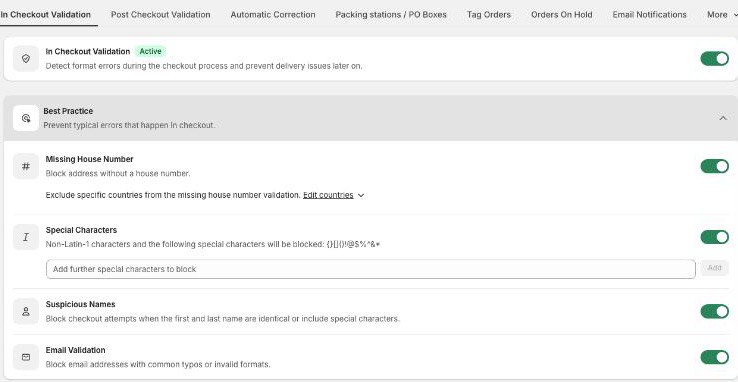
Available validation rules
Missing house number (with per-country exclusions)
Address with special characters
Custom regex
Packing stations / P.O. boxes
Name format (suspicious names)
Emails with typos
Character limits for address line 1 and 2, name and company field
Activate Validate in checkout in the app, then enable the rules you want:
See the Setup guide: in-checkout and post-checkout for the checkout-editor permission that must also be set.
What in-checkout validation does NOT do
It checks the format, not whether the address actually exists. Verifying an address against real address databases would slow the checkout down, and Shopify does not allow apps to block the address step with external lookups on standard plans. That is exactly what the post-checkout stage is for: right after the order, AddressHero validates the full address against official databases and corrects or flags it. See Post-checkout correction explained.
So the two stages share the work: in-checkout stops broken input before it becomes an order, post-checkout catches wrong-but-well-formatted addresses.
Which checkouts can be blocked
AddressHero can block checkout attempts made via Shopify-integrated payment methods (Shopify Payments, PayPal in the regular checkout). Express checkouts (PayPal Express, Apple Pay) and redirect-based or custom payment methods (iDEAL, Klarna, bank transfer) cannot be blocked on standard plans; on Shopify Plus, redirect-based methods can be blocked too. Details: Blocking invalid checkouts (Plus and non-Plus) and Express wallets and landing-page checkouts.
Good to know
If your store runs more than 9 active languages, Shopify's validation function limit is exceeded and the in-checkout validation stops working entirely. Reduce the active languages if you rely on the in-checkout block.
Logged-in customers with pre-filled addresses are validated exactly like guests.
Disable in-checkout validation
Turn off Validate in checkout in the app settings. The checkout stops blocking on these rules while the app stays installed, and you can turn the toggle back on any time. To pause the other stage instead, see Post-checkout correction explained for how to disable post-checkout validation.
Related articles